IN Brief:
- XJTAG Layout Viewer is a free desktop tool for inspecting ODB++ PCB layout data.
- The software supports net, component, and pin search, layer control, measurement, and board navigation.
- The tool gives design, test, repair, and manufacturing teams faster access to physical layout data.
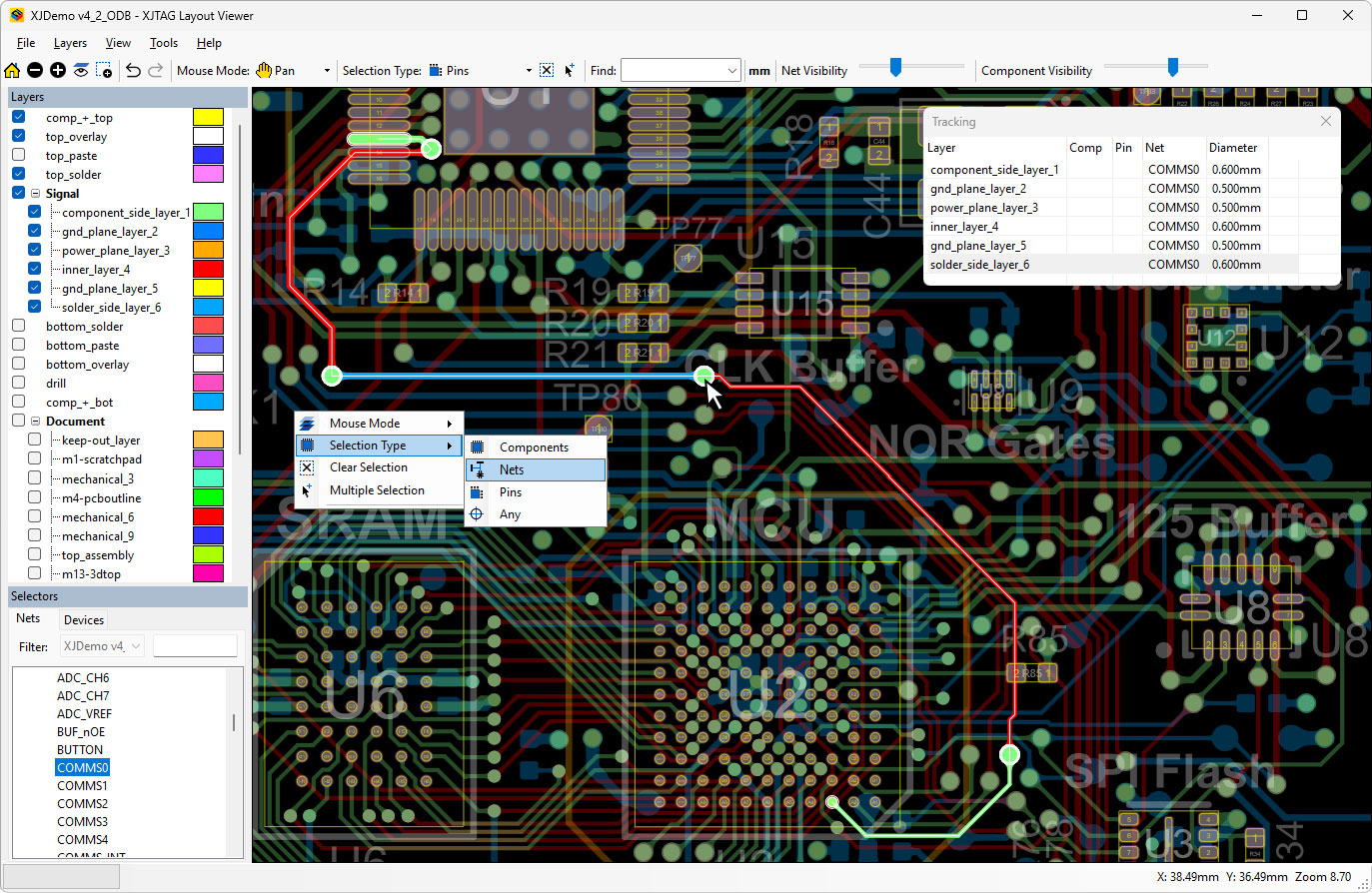
XJTAG has released XJTAG Layout Viewer, a free desktop tool for viewing and inspecting PCB layout data in ODB++ format.
The software allows engineers to explore board layouts, locate devices, pins, and nets, and inspect circuit structure without opening a full electronic design automation environment. ODB++ data can be exported from major EDA tools, giving the viewer a role across design review, manufacturing support, debug, test, and repair workflows.
The tool includes search and highlighting for components, pins, and nets, as well as net-based navigation across the PCB layout. Users can pan, zoom, rotate, view the underside of a board, show or hide individual layers, customise layer colours, measure distances between objects, navigate selection history, and export the current view to a file or printer.
XJTAG has also included command-line launch support, allowing users to jump directly to specific nets, devices, or pins. That makes the software easier to connect with test results, automated reports, and fault logs, where a known electrical issue needs to be mapped quickly to a physical board location.
The software runs as a lightweight offline desktop application and uses GPU-accelerated rendering. Recommended system requirements include Windows 11, 8GB of RAM, and an Intel Core i3, i5, or i7 processor or equivalent.
Modern PCB layouts are denser, more layered, and more dependent on high-speed and mixed-signal routing than previous generations. When a board fails during bring-up, manufacturing test, or field return analysis, engineers need to move quickly between schematic intent, net identity, physical routing, and component placement.
Full CAD environments remain essential for design creation and revision control, but they are not always available to production engineers, test engineers, repair teams, or field-support staff. Licensing restrictions, workstation access, project permissions, and training requirements can all slow down fault isolation.
A free viewer that opens manufacturing data directly can reduce handoffs between design and production teams. ODB++ files often travel further downstream than the original CAD project, particularly into fabrication, assembly, and test. Working from that data gives technicians and engineers a practical route into the board layout without disturbing the controlled design environment.
The release also fits the increasing connection between design, manufacturing, and test data. Boundary-scan results, automated optical inspection, in-circuit test, functional test, and failure analysis all gain value when electrical results can be mapped to the physical PCB. As boards become harder to probe and rework manually, layout visibility becomes a practical requirement for efficient debug and repair.